

The must-have tool for presentations
ZoomIt is an annotation and zooming tool that works on all Windows devices. The tool has many applications but you can use it to give demonstrations and presentations. Since ZoomIt continues to run in the background, you can easily activate it using customizable keyboard shortcuts. You can use the hotkeys to zoom in and out of the screen, move around the zoomed image, and even draw or write when needed. ZoomIt supports pen input and is also available for download on iOS devices.
What is ZoomIt?
ZoomIt is a productivity tool that helps users improve the performance of their presentations by turning their tablet PCs or laptops into responsive whiteboards. You can use the tool to effectively communicate your thoughts by guiding your audience using screen zoom and sketching or typing when required.
Rather than a standalone software, ZoomIt functions as an extension of your PC’s operating system. It continues to run in the background and gets activated with a single click of a button. It’s quite accessible and stays out of sight when it’s not needed. ZoomIt has multiple uses and is suitable for business meetings, conferences, instructional videos, as well as application demonstrations.
How do I use ZoomIt software?
Using the ZoomIt tool is quite easy, and you can learn all its functions within minutes. Once installed, the software sits in the system tray until you use the designated keys to activate it. Because the software is small in size, it hardly takes up any space on the computer. Moreover, you can easily customize all the designated keys to change them right after the first launch.
Zoom in and out quickly
While you’re working on your PC, you can activate ZoomIt using the default keys: Control and 1 pressed together. Once activated, you can use the up and down keys or the mouse scroller to zoom in and out of the screen. Since the tool is easy to switch on and off, it comes in extremely handy when you want to magnify the screen while you’re giving a presentation. You can also use it to zoom in on websites like Twitter and Facebook.
Demonstrate user journey
Instead of just zooming in and out of the screen, you can use the advanced Live Zoom feature of the software to create a user journey. The function lets the audience see the mouse pointer so they’re aware of the exact location of your clicks. This feature is especially useful when giving out instructions or application and website demonstrations.
Draw directly on the screen
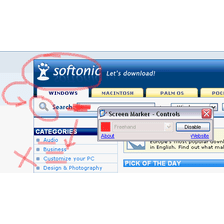
ZoomIt is a dedicated presentation tool and you can pull it out anytime you wish to draw on the surface of the screen. This function comes quite handy when you need to draw an arrow or circle to bring focus to a certain detail on the screen. Furthermore, you can easily change the color or thickness of the pencil as per your requirement. If you use a touchscreen device, ZoomIt will also respond to your finger or pen input.
Create a countdown
An additional function of ZoomIt is the countdown feature, which you can use to build anticipation for a product demonstration. You can also use it to create a fixed time limit for getting user feedback or for answering questions. The software also lets you customize the time, location, and background of your countdown. To activate it, all you need to do is click on the designated countdown shortcut.
Customize hotkeys
The first time you launch ZoomIt, a configuration box opens up. It not only explains how the software functions but also lets you customize all available hotkeys. You can edit the keys used for activating the tool, entering zoom mode, and opening the drawing mode. The shortcut for entering drawing mode without zooming can also be customized, along with the key that opens the ZoomIt timer.
Present easily
One of the best parts about using the ZoomIt application is that it doesn’t cause any interruptions while you’re presenting. This is quite essential when you’re in an important business meeting and don't wish to fumble around launching third-party tools. You can simply click a button to zoom in, draw, or type, and retain control over the entire presentation.
What is the shortcut key for draw mode in ZoomIt?
While you can customize all ZoomIt shortcuts, the default combination to enter draw mode is Control key pressed with 2. You can also change the color of the pencil after you’ve entered the drawing mode. You just need to click on R to change the color of the pencil to red, G for green, B for blue, P for pink, and so forth. All of these are helpful in terms of highlighting different areas of an image on the screen.
How do I change the size of the ZoomIt pen?
Once you enter the drawing mode, the mouse pointer becomes a pen. You can easily change the width of this pen by pressing the left Control key along with the up and down keys. You can scroll on the wheel of your mouse; pressing Control will work as well.
How do you copy a screen with ZoomIt?
To copy a screen or take a screenshot using ZoomIt, you must activate the tool without entering Zoom mode. You just click on the Control key along with 2 to enter Draw mode. Once there, you can click on Control and S together and save the screenshot to a folder of your choice.
Does ZoomIt have any specific system requirements?
ZoomIt is a freeware program that works well on all Microsoft Windows devices. You can download the utility tool on your 32- or 64-bit computers without any hassle. The latest version of the tool operates smoothly on Windows 7 as well as Windows 10 devices.
Are there any ZoomIt alternatives?
If you’re looking for similar programs to ZoomIt, you should check out Magnifixer, Virtual Magnifying Glass, and Microsoft Whiteboard.
Should I download ZoomIt?
If you regularly give presentations or app demonstrations, you should go ahead with the ZoomIt software download. The easy-to-use software makes presenting a lot easier. Zoom anywhere on the screen, annotate, type, capture screenshots, and show complete user flow using ZoomIt. Since the app continues to run in the background, you can activate it with just the click of a button.













.png)













User reviews about ZoomIt
by Roberto
Lo mejor que encontré para escribir en pantalla
by Anonymous
Excellent tool for IT teachers or anyone regularly holding presentations.
Excellent tool for IT teachers or anyone regularly holding presentations
Pros:
Screen captioning
Ease of use
Cusomizable
Cons:
Support for non-english characters (éáűúőóüöí) More
by Anonymous
As simple as powerful..
I needed a simple and easy to use screen pen and this is exactly that. Very slim, no instalation.
Pros: Simplicity of use and access
Cons:
A mew more options for colors, shapes, linestyles, ... More